# Trilium Notes v0.105.0 - Product: Trilium Notes (https://whatsnew.fyi/product/trilium) - Vendor: TriliumNext - Date: 2026-08-19 - Version: v0.105.0 - Original notes: https://github.com/TriliumNext/Trilium/releases/tag/v0.105.0 - Permalink: https://whatsnew.fyi/product/trilium/releases/v0.105.0 - Labels: Platforms: Desktop What's New is an index, not a publisher: every entry below links to the vendor's own release notes, which are the authoritative source. Entries are labelled where they are hand-curated sample data, pre-releases, or drawn from a secondary source such as a developer blog. Reuse: the summaries, labels and curation here are © What's New. Quote freely with attribution and a link back; wholesale republication of the corpus is not permitted — terms: https://whatsnew.fyi/terms. The vendors' own release notes remain their publishers'. --- - **added** — Space Usage tool that visualizes notes, revisions and attachments as a treemap by disk usage - **added** — Cleanup tool to erase deleted notes, trim old revisions, drop unused attachments and compact the database - **added** — Compress images feature to resize oversized pictures from notes, tree, attachments list, image viewer or cleanup run - **added** — Automatic image compression on upload, paste and import that preserves PNG format and skips already-compressed pictures - **added** — Dedicated Attributes sidebar tab showing owned, inherited and promoted attributes with in-place editing - **added** — System attributes marked with icons in sidebar and badges in autocompletion with descriptions - **added** — Attribute value editors with specialized controls including colour pickers, URL fields and date selectors - **added** — Mobile attribute editor with the same interface as desktop - **added** — Backup compression and encryption using AES-256-GCM with password stored in operating system keyring - **added** — Backup restore functionality during initial setup and from Options → Backup - **added** — Backup validation before restoration and automatic rollback on failed restore - **added** — Resumable backup uploads from browser and support for multi-gigabyte backups - **added** — Content manager listing all scripts, themes and widgets grouped by category with ability to toggle them off - **changed** — MCP now requires authentication and can optionally be accessed over the network - **changed** — General HTML support in text notes is now disabled by default - **changed** — Divs in text notes are now unwrapped instead of being preserved as-is - **changed** — Image compression on import now runs off the thread serving the app to prevent freezing - **changed** — ARM64 Docker image is now based on Debian 13 trixie - **fixed** — Attribute editor and configuration modal received fixes #### v0.105.0 > [!IMPORTANT] > If you enjoyed this release, consider showing a token of appreciation by: > > * Pressing the “Star” button on [GitHub](https://github.com/TriliumNext/Trilium) (top-right). > * Considering a one-time or recurrent donation to the [lead developer](https://github.com/eliandoran) via [GitHub Sponsors](https://github.com/sponsors/eliandoran) or [PayPal](https://paypal.me/eliandoran). _The release that makes Trilium lighter, more visual and easier to organise: images shrink themselves, attributes get a home of their own, and your backups can finally be restored._
🚨 For ARM64 Docker users

The arm64 image is now based on Debian 13 "trixie", as Debian 11 reaches end of life on 2026-08-31. Your host needs a libseccomp new enough to know the clone3 syscall (roughly 2.5+), or the container will fail to start. If it does, add:

services:
  trilium:
    security_opt:
      - seccomp:unconfined

Updating Docker itself will not help since runc links the host's libseccomp. The 32-bit linux/arm/v7 and linux/arm/v8 images and the native ARM builds are unaffected.

> [!WARNING] > **Before you upgrade.** This release contains changes that can break an existing setup. > > 1. **MCP now requires authentication** and can optionally be accessed over the network. → _Reconfigure your existing MCP clients with credentials._ > 2. **General HTML support in text notes is now disabled by default.** This makes copy-paste from websites behave well, without grabbing unwanted tags such as input boxes. → _Re-enable via Options → Text notes → Preserve unsupported HTML tags._ > 3. `**
**`**s in text notes are now unwrapped** instead of being preserved as-is, regardless of settings. This prevents broken behaviour when entering new paragraphs, and bugs such as being unable to exit a code block. ##### ✨ Highlights ###### Know what's in your database — and take it back
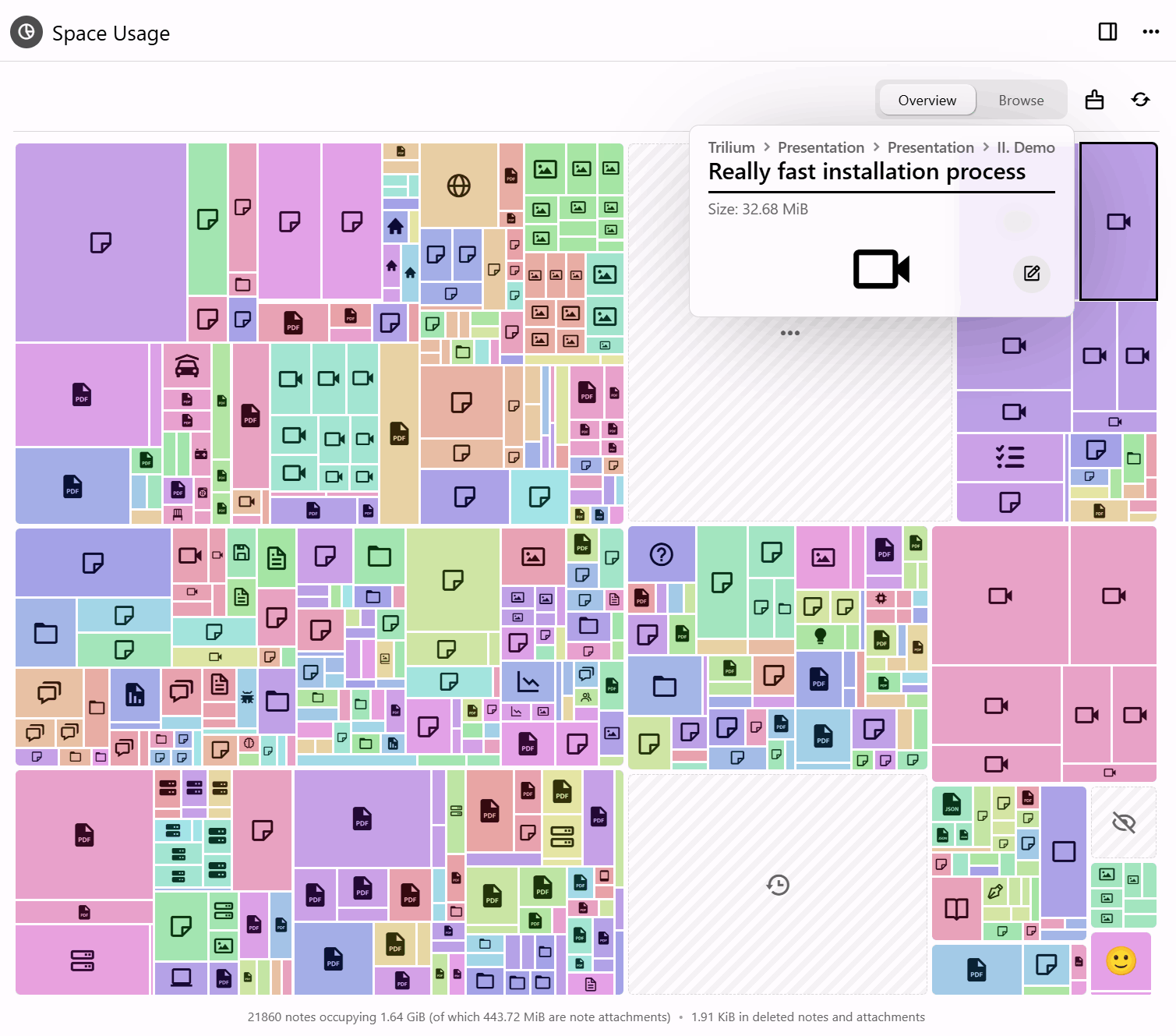
Two new tools answer the same question from opposite ends: what is actually taking up all that room? * **Space Usage** draws it as a treemap — notes, revisions and attachments sized by how much space they take — so the thing quietly eating your disk is visible at a glance instead of guessed at. The **cleanup tool** then acts on what you find: erase deleted notes, trim old revisions, drop unused attachments and compact the database. * **Compress images** goes after the usual culprit, resizing oversized pictures and re-saving them smaller — from a note, the tree, the attachments list, the image viewer or the cleanup run itself. It tells you what it found before it starts and what it saved when it finishes. Automatic compression on upload, paste and import now keeps PNGs as PNGs, leaves already-compressed pictures alone, and runs off the thread serving the app, so a large import no longer freezes Trilium. _(@adoriandoran)_ ###### Attributes finally have a home
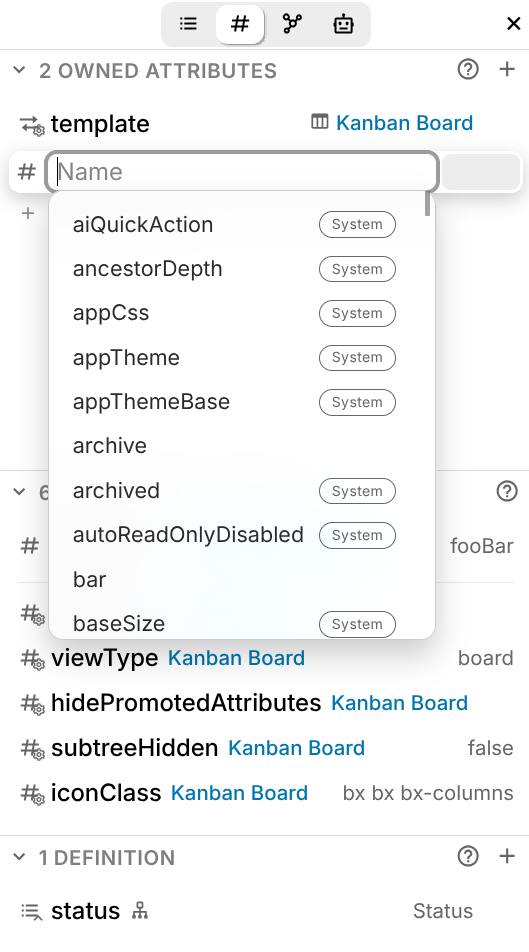
A dedicated **Attributes** sidebar tab shows owned, inherited and promoted attributes in one clear list, and lets you edit them in place. System attributes are marked with an icon in the _[Truncated at 4000 characters — full notes: https://github.com/TriliumNext/Trilium/releases/tag/v0.105.0]_