Bank Tags, Trouver System Rework & More! | June 17th
- Bank Tags feature for mobile and the Official Client allowing creation of up to 20 tags with custom icons and drag-and-drop organization
- Two new Slayer unlocks for Frost Dragons: Chance of Heavy Frost increases weighting from 5 to 8, and I See Dragon increases task length to 180-240 assigns
- Made the head of Soulreaper Axe (o) larger
- Demonic Pacts Throne Scroll no longer requires a Construction level requirement to apply to a Demonic Throne
- Two-handed League VI trophies and Storm cruiser's coat no longer form a tail behind you when equipped
- Uncharged Toxic Trident (e) (o) made darker to be more visually distinct from Trident of the Swamp (e) (o), and Trident of the Seas (o) icons rotated to match non-ornamented version
- Ornamenting Trident of the Swamp, Trident of the Seas, and Iban Staff now works bidirectionally with their ornament kits
- Updated examine texts of Leagues VI trophies to reflect extended end date
- Adjusted Bounty Tasks rewards to better reflect participation
- Market values of several Sailing uniques adjusted to better align with Grand Exchange prices
- Untradeables with no combat benefits no longer lost on death in Wilderness
- Untradeables with some combat bonuses break and require repair without Trouver parchment
- Untradeables with strong combat bonuses require Trouver parchment once, then never again
- Bug causing Veiled Kraken to give off-task rates while on a Bounty Task for Dragon Cannon Barrel
- Fixed issue where looting sea creatures while operating a cannon required re-engagement with the cannon
- Haddock now correctly restores Hitpoints to 109 when eaten at 100-108 Hitpoints while overhealed
- Falo the Bard now accepts Trailblazer Reloaded variant of Infernal Axe (or) for clue steps
- Players with multiple Bounty Tasks no longer receive multiple bounty item rolls from a single kill
We've got a jam-packed game update this week: Bank Tags for mobile and the Official Client, Leagues VI rewards tweaks, new Slayer unlocks for Frost Dragons, Trouver System Rework and more!
Heads up: As we prepare for the launch of Blood Moon Rises on June 30th, there will be no game update next Wednesday, June 24th. See you on June 30th, for the rise of the Blood Moon!
Changelog - June 17th
[expand type=details expanded=false]
Bank Tags
Bank Tags for mobile and the Official Client are here!
-
You can create up to 20 Bank Tags.
-
To create a Bank Tag:
-
Select the lil' + button in the top-left corner of your Bank
-
Give your tag a title in the chat box that opens
-
Next you'll get a search box where you can select an item to represent your tag as an icon
-
Drag and drop an item from your main bank to your tag icon on the left to fill your tag
-
To swap into your tag-view, simply select the icon and it'll pull up your tag. Tap or click it again to switch back to the bank.
-
You can move your items around into any order you like, including leaving gaps or whole lines between items if you like.
-
You can also duplicate tags by selecting duplicate from the minimenu, or if you're using a keyboard and mouse, you can hold shift while you drag an item and it'll spawn a new one.
-
Unfortunately for you rare item collectors this only duplicates the tag not the item! You've still got to grind for those T-bows!
-
Read more details in its dedicated section further down the blog.
Leagues VI Rewards Tweaks
- Made the head of Soulreaper Axe (o) larger, more befitting for its mighty makeover.
- The Demonic Pacts Throne Scroll no longer has a Construction level requirement to apply to a Demonic Throne.
- Equipping the two-handed League VI trophies and the Storm cruiser's coat will no longer form a tail behind you.
- The uncharged Toxic Trident (e) (o) has been made darker to make it more visually distinct from the Trident of the Swamp (e) (o). Also, the icons for the Trident of the Seas (o) has been rotated to match its non-ornamented version.
- Ornamenting the Trident of the Swamp, Trident of the Seas and Iban Staff now works in both ways: either by using the staves on their respective ornament kits, or by using the kits on the staves.
- The examine texts of Leagues VI trophies have been updated to reflect the extended end date of the Leagues.
- Not Demonic Pacts related, but still Leagues-related: Falo the Bard will now accept the Trailblazer Reloaded variant of the Infernal Axe (or) for his clue step asking for an Infernal Axe.
Sailing Improvements
-
Added two new Slayer unlocks to Frost Dragons:
-
Chance of Heavy Frost: This unlock allows you to increase the _weighting _of Frost Dragon tasks from 5 to 8 on both Nieve and Duradel, making it more likely to receive these as tasks.
-
I See Dragon: This second unlock allows you to increase the task length of Frost Dragon Tasks, so you can keep slaying them for longer. Once this is unlocked, you'll be assigned between 180 to 240 Frost Dragons on both Nieve and Duradel.
-
These unlocks cost 100 Slayer Points each. Also, both of these unlocks can be disabled without a refund, should you prefer to.
-
Bounty Task & Other Sailing Changes:
-
Adjusted Bounty Tasks to ensure that their rewards better reflect participation.
-
Players with multiple Bounty Tasks will also no longer receive multiple bounty item rolls from a single kill.
-
Fixed a bug causing Veiled Kraken to give off-task rates while on a Bounty Task for the Dragon Cannon Barrel.
-
Adjusted market values of several Sailing uniques to better align them with their current Grand Exchange prices.
-
If you loot sea creatures while operating a cannon, you will no longer have to re-engage with the cannon. This means you'll now continue firing the cannon automatically after looting nearby sea creatures.
-
If you are already overhealed from a Haddock and have between 100 and 108 Hitpoints, eating another Haddock will now correctly restore your Hitpoints to 109.
Trouver System Rework
-
To reduce the chances of players losing crucial untradeables in the Wilderness, we've applied the following changes:
-
Untradeables with no Combat benefits should never be lost on death,
-
Untradeables with some Combat bonuses should break and need repairing without a Trouver parchment,
-
Untradeables with strong Combat bonuses should need to be 'Trouvered' once, then never again.
-
Untradeable items that previously didn't 'break', for example the Graceful set, will no longer be lost on death above Level 20 Wilderness.
-
Untradeable items that previously broke will continue to break whether below or above level 20 Wilderness, but will no longer be lost. You'll continue to receive their 'broken' version and can repair them at Perdu for a small fee. Visit its dedicated section to see the items in this category.
-
'Higher tier' untradeables will continue to use the Trouver Parchment system, but with a crucial change: once a Trouver parchment has been used on an item, it will remain in that state forever, the parchment will not be lost on death.
-
On death below Level 20 Wilderness (or in PvP Worlds for fights at the Grand Exchange, for example), these higher tier items will simply break and be repairable with the current fee.
-
On death above Level 20 Wilderness, the item will become 'mangled' and require a higher fee of 500,000 GP to fix.
-
You can still use the item on Perdu to remove the Trouver Parchment, should you wish to. Note that if you do not add a Trouver parchment to your 'higher tier' items, they will continue to be lost above 20 Wilderness.
-
In cases where items are kitted using things like Ornament kits, the usual behaviour will occur and whoever kills you should receive the Ornament kit used, provided the Ornament kit is tradeable. For example, on death above Level 20 Wilderness, Dragon Defender (t) will break but it won't be lost, and the Dragon Defender Ornament Kit will go to the PKer.
-
Though it didn't make it into this game update, there is one additional change we're working on: attempting to enter the Wilderness with any untradeable item that requires a Trouver Parchment to be protected will display a warning to make sure you're aware that you're risking an untradeable.
Last Man Standing Changes
- Added Dragon Crossbow and Opal Dragon Bolts (e) to the Max/Med loadout, and removed Rune Crossbow and Diamond Bolts (e).
- If you have the "Automatically smash empty vials" setting disabled, you will now keep the vials in your Inventory once a potion is fully consumed in Last Man Standing.
- Adjusted the default preset for players who have never played Last Man Standing before to have 3 Saradomin brews, 2 Sanfew serums and 10 sharks.
- Replaced the Berserker ring with the Berserker ring (i) in the starter kit for all builds.
- Set the default spellbook to Ancient Magicks if the player is brand new to the Last Man Standing gear setup.
- Zuriel's staff in Last Man Standing is now able to autocast Ancient Magicks spells as well.
- Added the Oathplate helm into the "Max/Med defensive" loot pool.
- Replaced the Dragon dagger with Dragon claws in the "Max/Med" starter kit.
- If sharks are dropped on the floor because the Inventory was entirely full, the sharks received when refilling your Inventory after a kill will stay on the floor only for 1 minute, as opposed to 10.
Additionally, we've also got a change for Emir's Arena:
- Added Ancient warriors' weapons to the list of items that can be used at Emir's Arena.
Other Changes
- Herb patches in Weiss and Trollheim now display what herb they contain.
- The hitbox on Huasca herbs now matches that of other herbs.
- Adjusted the Portal Nexus interface to make teleport options easier to read.
- The Blue Moon spear's special attack tooltip now refers to the Blue Moon set by its correct name.
- Fixed a bug where if a player used the special attack of Vesta's Spear (bh) and then switched weapons, ranged damage wasn't being blocked. Now, both melee and ranged damage are blocked regardless of whether or not the player has Vesta's Spear (bh) equipped after using its special attack. We have also changed Vesta's Spear (Deadman Mode) to have the same functionality.
- Level-up messages will no longer list the same spell multiple times when it is available through more than one spell book.
- The Bottomless Milk Bucket now works with the Zanaris Dairy Cow.
- On C++ client, if you have an active clue and the Clue Helper setting is on, the music player will now automatically scroll to the track you need to play for Cecilia.
Additionally, we've fixed various Z-buffer related graphical issues:
- The shadows of Penance Queen and its pet no longer flicker.
- Various NPC models across Gielinor (such as Prince Ali, Philippa, Watson, Freaky Forester etc) no longer have clipping issues.
- In Stronghold of Security, dropped items no longer clip into the ground.
- Bandos Godsword no longer clips with the table.
- Resolved flickering issues with the Hallowed Sepulchre pillars, Emir's Arena and Clan Wars portals, the entrances of Waterbirth Island Dungeon and Lovakengj Minecart Network.
- Guardians of the Rift statues and Prifddinas Agility Course Portal no longer flicker with the terrain.
- Dropped bones no longer clip with the carpets at Keep La Faye.
- Resolved flickering and clipping issues at the Kourend Castle Tower, Varrock bank roof, the snow-covered mountain within Stranglewood, Elemental Workshop Mind Chamber, Myths' Guild, the caves visited during the Recipe of Disaster quest and more.
- Fixed various clipping issues caused by intersecting levels and floors across Gielinor - for instance, Red Axe Caves.
- Fixed various clipping issues that occur when objects are on top of each other, such as pages on top of the crates in Red Axe Caves.
- The feet of player characters no longer clip into the floor at the Agility Pyramid, the Arceuus Library, the basement of the Varrock Museum, grounds outside the southern entrance of Varrock, Lumbridge Castle kitchen and Shayzien Encampment wooden kits.
- The feet of birds in Tel Teklan no longer clip into surfaces.
- Fur rugs in the Ardougne Marketplace no longer phase into the ground.
- The QR code tiles in Shayzien are once again visible.
PvP Rota
The PvP rota has moved to Period A:
- 539 - (US) - PvP World
- 318 - (UK) - Bounty Hunter World
- 548 - (Germany) - High-Risk PvP World
- 577 - (US) - Free-to-Play PvP World
- 559 - (UK) - LMS Competitive
World 390 (AUS) for LMS Competitive has been activated with this rota.
World 569 (AUS) for Bounty Hunter has been activated with this rota.
The PvP Arena is using '1 Def Pure' loadouts in Ranked Duels and Tournaments this week.
Bank Tags
Bank Tags for mobile and the Official Client are here!
If you can't see the gif above, click (https://cdn.runescape.com/assets/img/external/oldschool/2026/Newsposts/2026-05-29/BankTags2.gif)!

Pre-plan your gear, lay out your pots and food for easy access and be ready to take on whatever content you're heading to next.
Before using the Bank Tags, make sure you have the mobile app and the Official Client updated to the latest version. And if you have used Bank Tags before updating, you will need to delete all Bank Tags using the functionality provided.
Creating Bank Tags
Watch how to create a bank tag (https://cdn.runescape.com/assets/img/external/oldschool/2026/Newsposts/2026-06-17/banktags.mp4)!
Creating a Bank Tag is super simple. You'll now find a little + button in the top-left corner of your Bank. Selecting this will open up a chat box where you can give your tag a title. Our usual chat filters apply here, and you can use up to 25 alphanumeric characters.
Following your feedback from the Summer Campfire, we've increased the total tags you can create to 20. Hopefully this feels like more breathing room to cover all your bases.
Next you'll get a search box where you can select an item to represent your tag as an icon. You can use pretty much any item in the game, both tradeable and untradeable.
Then, it's time to fill your tag! It's as easy as dragging and dropping an item from your main bank to your tag icon on the left. It'll drop in there ready for you to organise your layout.
To swap into your tag-view, simply select the icon and it'll pull up your tag. Tap or click it again to switch back to the bank. You can move your items around into any order you like, including leaving gaps or whole lines between items if you like. You can also duplicate tags by selecting duplicate from the minimenu, or if you're using a keyboard and mouse, you can hold shift while you drag an item and it'll spawn a new one!
Unfortunately for you rare item collectors this only duplicates the tag not the item, you've still got to grind for those T-bows!
If you can't see the image above, click (https://cdn.runescape.com/assets/img/external/oldschool/2026/Newsposts/2026-06-17/manifesting.jpg)!
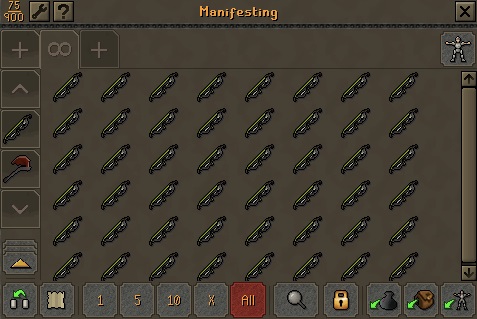
Removing an item from a tag is as easy as selecting "remove from tag" from the minimenu. You can delete the whole tag by opening the tag's minimenu and selecting "delete tag". You'll get a warning message first so there's no accidental misclicks!
You can also drag your tags up and down the list so your favourite or current activity tags are right at your fingertips.
It's pretty much as easy as that! You will see a few more or a few less tags depending on whether you have the incinerator active, Potion Storage and/or Group Ironman Storage. We've popped a couple of screenshots below so you know what to expect.
If you can't see the image above, click (https://cdn.runescape.com/assets/img/external/oldschool/2026/Newsposts/2026-06-17/tags1.png)!

Get Inspired
Want to get stuck in to Bank Tags but unsure of what would make for a useful layout or collection? We caught up with content creators and asked them to share some of their go-to layouts! Want to take on bosses with a little help from MMORPG? Or do some Clue hunting like Megan? Well, here you go!
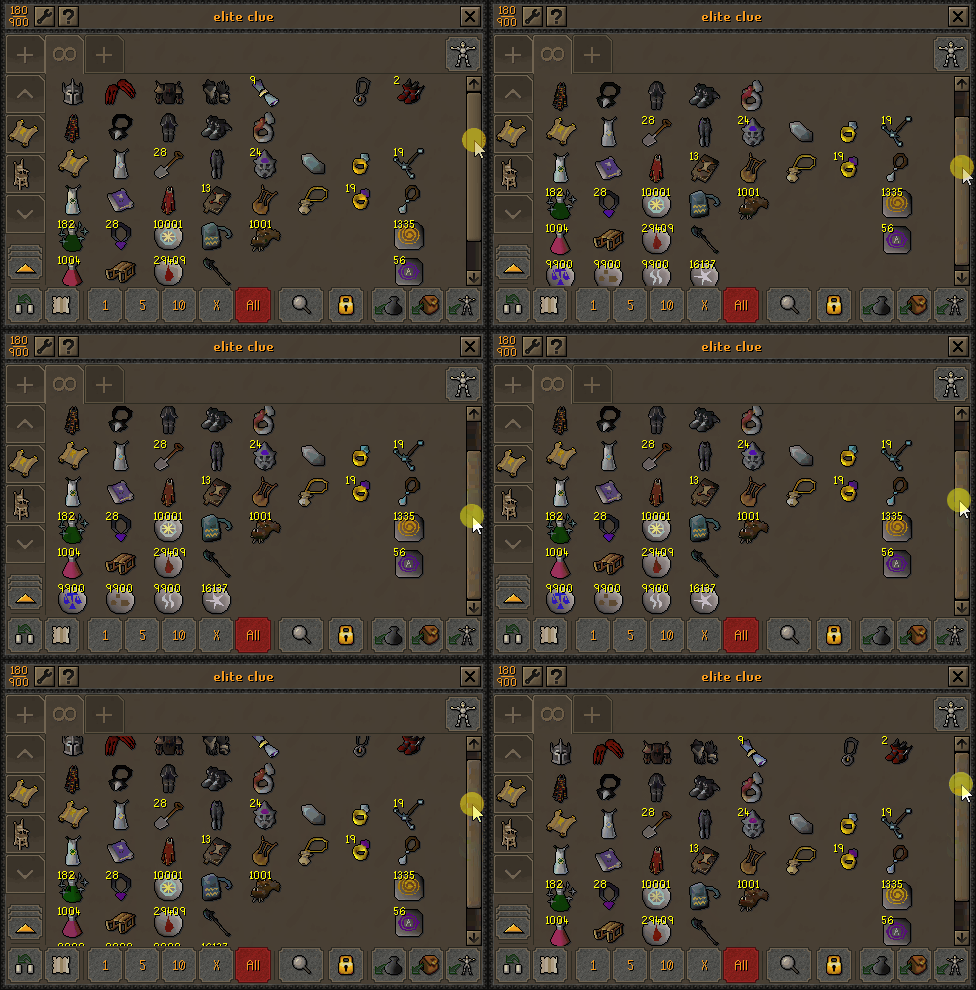
Take on some Elite Clue Scrolls with the help of (https://www.twitch.tv/megan)'s tag layout. If you can't see the gif above, click (https://cdn.runescape.com/assets/img/external/oldschool/2026/Newsposts/2026-06-17/BankTags_megan2.gif)!
(https://www.twitch.tv/mmorpg)'s got you sorted for your next Doom of Mokhaiotl showdown. If you can't see the image above, click (https://cdn.runescape.com/assets/img/external/oldschool/2026/Newsposts/2026-06-17/mmorpgbanktag1.jpg)!

Go on a Farming run with (https://www.twitch.tv/zecookies)' guidance. If you can't see the gif above, click (https://cdn.runescape.com/assets/img/external/oldschool/2026/Newsposts/2026-06-17/BankTags_zecookies3.gif)!

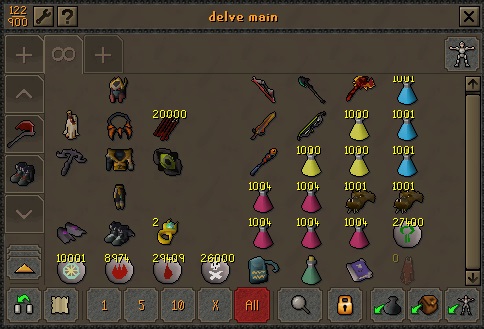
Or test your mettle by taking on some delves with the help of (https://www.twitch.tv/muts). If you can't see the image above, click (https://cdn.runescape.com/assets/img/external/oldschool/2026/Newsposts/2026-06-17/MutsDelveBankTag3.jpg)!
FAQs
We caught a few questions being asked after our announcement, and we know it can be tricky to track those answers down spread across various platforms and comment replies. So, here are our answers all rounded up into one spot, and we'll keep this updated as we see more coming through.
How do Bank Tags interact with Potion Storage?
Right now, they act as two different entities. So if you want to make a tag with any potions, or to withdraw then via your tag, you'll need to make sure they're in your bank-proper, as opposed to the storage.
Will these tags affect any Bank Tags I have in approved third-party clients?
Nope! This system is only being implemented on our C++ client and mobile, meaning any approved third-party client tags will be completely unaffected.
Will tags interfere with my main bank at all?
No, whatever happens in a tag, stays in a tag! So you won't see any movement or separation in your main bank. Obviously any withdrawals will affect both, as the tag is merely a representation of your item.
Known Issues
- There is a known issue of duplicate icons appearing when searching for a suitable Bank Tag icon, we will resolve this in a future update.
If you do come across any issues not listed here, please drop us a message on Reddit or Discord in the Official Client section!
Wrapping up
We're so excited to get Bank Tags in your hands! We'll be keeping up with feedback so make sure you share your thoughts.
Leagues VI Rewards Tweaks
The Leagues Rewards Shop opened last week, allowing you to spend your hard-earned League Points and get those sweet shiny rewards. If you missed it, you can purchase the Leagues VI: Demonic Pacts rewards from the Leagues Tutor, who can be found in the grounds of the Lumbridge Castle.
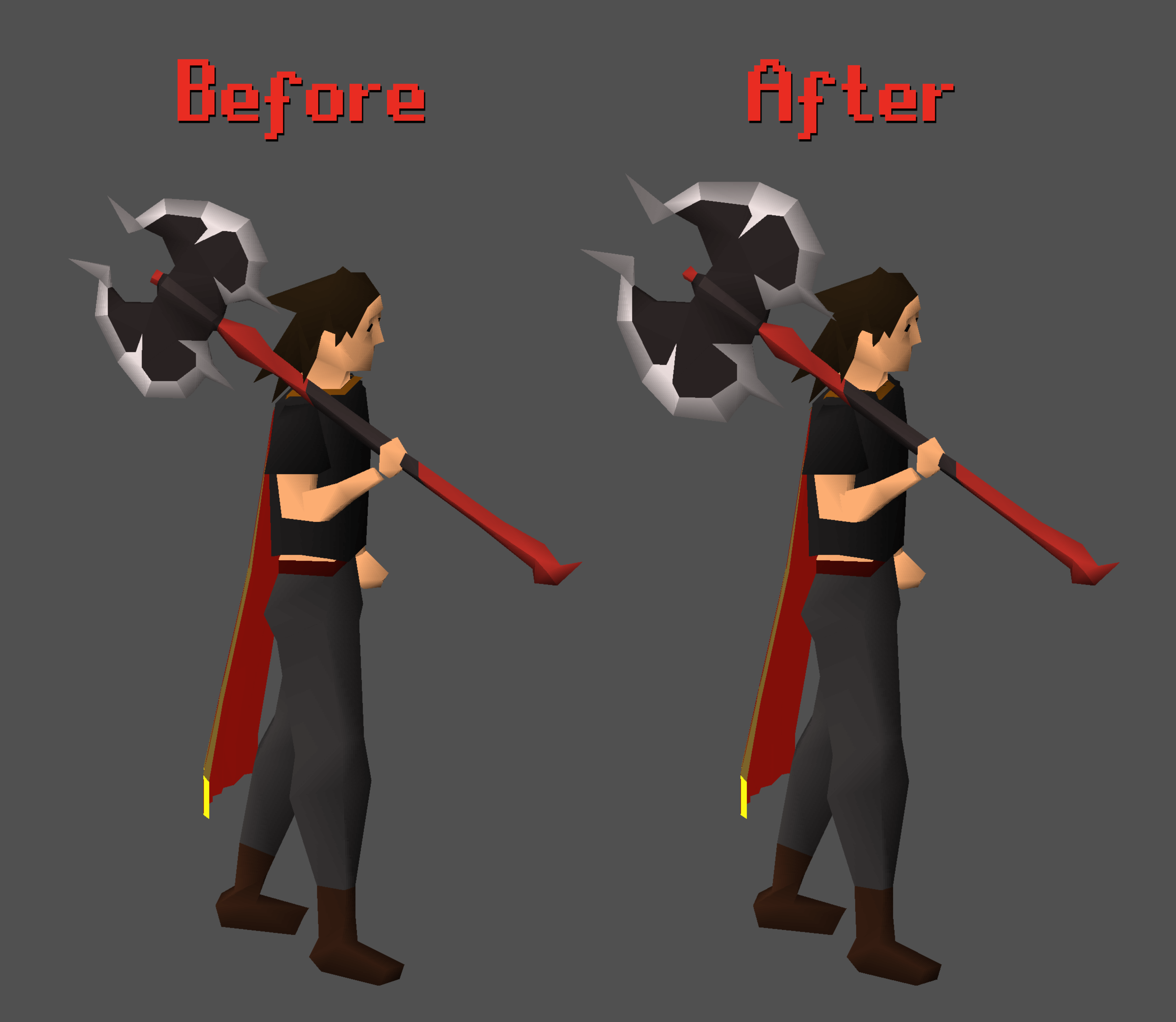
With the rewards being unlocked, many of you pointed out that the ornamented Soulreaper Axe with the Demonic Axe kit wasn't quite living up to the legendary presence of Yama's axe. We've taken that feedback to heart and made the head of Soulreaper Axe (o) larger, better reflecting its mighty makeover.
If you can't see the image above, click (https://cdn.runescape.com/assets/img/external/oldschool/2026/Newsposts/2026-06-17/srao.png)!
Besides the above adjustment, we've got a few more changes related to the League rewards:
- The Demonic Pacts Throne Scroll no longer has a Construction level requirement to apply to a Demonic Throne.
- The uncharged Toxic Trident (e) (o) has been made darker to make it more visually distinct from the Trident of the Swamp (e) (o). Also, the icons for the Trident of the Seas (o) have been rotated to match its non-ornamented version.
- Equipping the two-handed League VI trophies and the Storm cruiser's coat will no longer form a tail behind you.
- Ornamenting the Trident of the Swamp, Trident of the Seas and Iban Staff now works in both ways: either by using the staves on their respective ornament kits, or by using the kits on the staves.
- The exa